Configure settings to connect to this product via SSH.
SSH must be enabled when connecting to this product using a terminal emulator or similar device.
Click [Advanced Settings/Controls] - [SSH Settings] on the side menu.
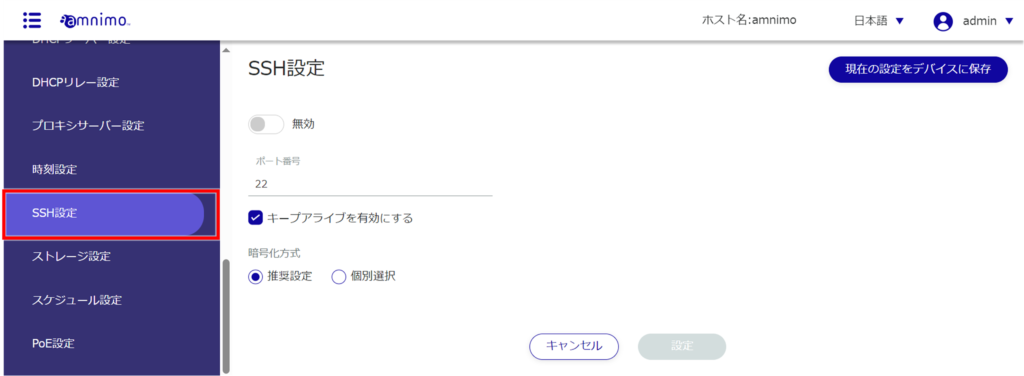
The "SSH Settings" screen appears.
Slide the toggle to set SSH as enabled.
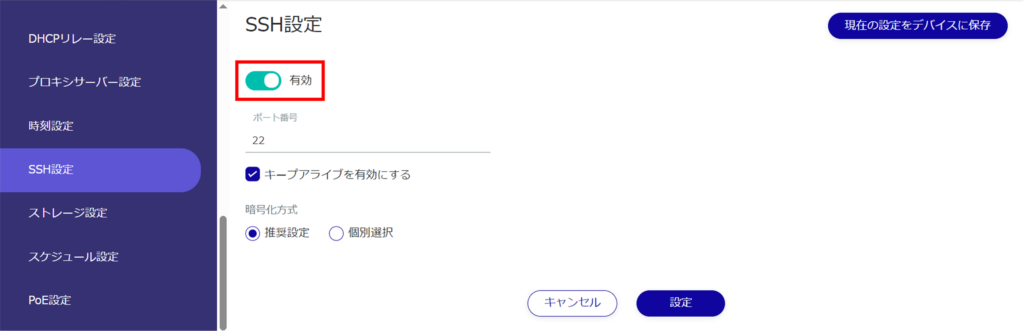
Set the following (1) to (2).
❶ Change the port number if necessary.

NOTE
- The port number can be set in the range of 1 to 65535.
- SSH uses port 22 as standard.
Note that if the port number is changed, the client must specify that port number to connect.
❷ By checking the "Enable keep-alive" checkbox, keepalive packets can be sent periodically to prevent SSH connections from timing out.

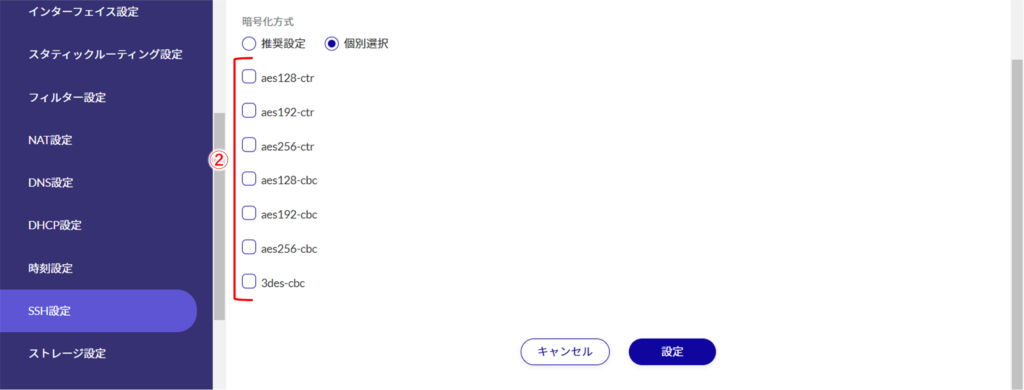
Set the encryption method.
❶ Select "Recommended setting" or "Individual selection" as the encryption method to be used.
- If you selected "Recommended Settings," go to Step 5.

❷ If "Individual Selection" is selected, check the checkbox for the encryption method to be used.
Click the [ Settings ] button.
SSH is configured.