Firmware updates for IoT routers can be updated over the network.
All of the following operations are performed by command.
- For more information on the Command Line Interface (CLI) for using commands, see "Chapter 1 CLI Basics" in the CLI User's Manual.
Update firmware over the network
Update firmware by specifying firmware on the network.
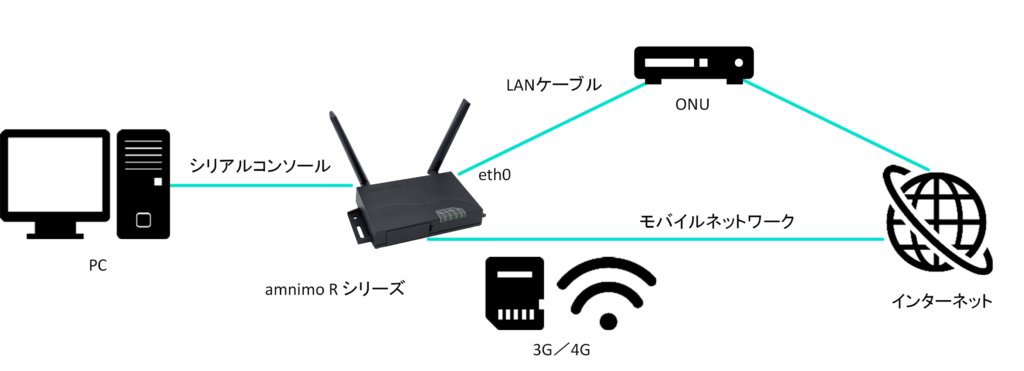
The default setting of the IP address on the eth0 side is fixed to the DHCP client. Please set it according to the network such as ONU (optical line terminating unit) on the Internet side.
- For details on how to change the network, see "6.2 Configuring Interface Settings" in the CLI User's Manual.
- For more information on mobile settings, please refer to "Chapter 5 Mobile Operations" in the CLI User's Manual.
- For details, see "1.2 Starting the Product's CLI" in the CLI User's Manual.
In order to retrieve the firmware, the following information is required: "connection and firmware", "account name", and "password".
The URL for the latest firmware used in the example run of this procedure is You must have the correct firmware for the version you are using.
- IoT Router (indoor version)
ftp://(account name):(password)@package.amnimo.com/firmware/ar10.amf - IoT Router (outdoor version)
ftp://(account name):(password)@package.amnimo.com/firmware/ar20.amf
Please contact our support separately for account and password information.
amnimo# firmware file check ftp://username:password@package.amnimo/com/firmware/ar10.amf
Downloading...
######################################################################### 100.0%
version: amnimo R series AR10 version 1.2.0 build 65671 contents: bootloader rootfs userfs sharefs
- For more information, see "2.4.2 Checking Firmware Files" in the CLI User's Manual.
Update the firmware file configured in step 3.
amnimo# firmware area update
reboot to update? (y/n): ← "y" key followed by Enter
- For more information, see "2.4.4 Updating Firmware" in the CLI User's Manual.
The IoT router reboots.
amnimo# show firmware
amnimo R series AR10 version 1.2.0 build 65671
- For details, see "2.4.1 Displaying the Firmware Version" in the CLI User's Manual.