
9.3 高低温度保護の設定をする #


筐体内が高温または低温になったときに、CPU動作周波数、モバイルモジュール、インターフェイスの状態を変更する設定を行います。
 | コンパクトルーターでは、本機能は利用できません。 |
|---|
9.3.1 高低温の保護設定を表示する #
高低温の保護設定を表示するには、show config thermalコマンドを実行します。
書式
show config thermal出力フォーマット
# ---- transition to configure mode ----
configure
# ---- thermal configure ----
thermal polling POLLING
# ---- cpufreq COND-NAME configure ----		←CPU動作周波数の設定が表示される
thermal cpufreq COND-NAME
ENABLE
mode MODE
temperature TEMPERATURE
hysteresis HYSTERESIS
LOG-DETECTION
LOG-RESTORATION
state STATE
exit
# ---- mobile COND-NAME configure ----		←モバイルモジュールの設定が表示される
thermal mobile COND-NAME
ENABLE
mode MODE
temperature TEMPERATURE
hysteresis HYSTERESIS
LOG-DETECTION
LOG-RESTORATION
state STATE
exit
# ---- interface COND-NAME configure ----	←インターフェイスの設定が表示される
thermal interface COND-NAME
ENABLE
mode MODE
temperature TEMPERATURE
hysteresis HYSTERESIS
LOG-DETECTION
LOG-RESTORATION
state STATE
exit
# ---- exit configure mode ----
出力項目
| 項目 | 内容 |
|---|---|
| POLLING | ポーリングを行う間隔(ミリ秒)が表示されます。 |
| COND-NAME | 条件名が表示されます。 |
| ENABLE | 各条件が有効/無効な場合の情報が表示されます。 ※1を参照 |
| MODE | モードが表示されます。 |
| TEMPERATURE | 高低温保護制御に入る温度が表示されます。 |
| HYSTERESIS | 高低温保護制御から復帰するヒステリシス温度が表示されます。 |
| LOG-DETECTION | 制御条件が有効化されたときにログ出力するかどうかが表示されます。出力する場合はログレベルが表示されます。 ※2を参照 |
| LOG-RESTORATION | 制御条件が無効化されたときにログ出力するかどうかが表示されます。出力する場合はログレベルが表示されます。 ※3を参照 |
| STATE | 高低温保護制御に入った時の制御状態が表示されます。 |
※1
| 設定 | 表示 |
|---|---|
| 有効 | 「enable」と表示されます。 |
| 無効 | 「no enable」と表示されます。 |
※2
| 設定 | 表示 |
|---|---|
| ログ出力有効 | 「log detection {ログレベル}」と表示されます。 |
| ログ出力無効 | 表示されません。 |
※3
| 設定 | 表示 |
|---|---|
| ログ出力有効 | 「log restoration {ログレベル}」と表示されます。 |
| ログ出力無効 | 表示されません。 |
実行例
管理者モードと設定モードで、コマンドの入力と出力は同じです。以下に、管理者モードの実行例を示します。


amnimo# show config thermal ⮠
# ---- transition to configure mode. ----
configure
# ---- thermal configure ----
thermal polling 1000
# ---- cpufreq high configure ----
thermal cpufreq high
enable
mode high
temperature 100.0
hysteresis 10.0
log detection warnings
log restoration notifications
state 200MHZ
exit
# ---- cpufreq low configure ----
thermal cpufreq low
enable
mode low
temperature -10.0
hysteresis 5.0
log detection warnings
log restoration notifications
state 1000MHZ
exit
# ---- mobile high configure ----
thermal mobile high
enable
mode high
temperature 100.0
hysteresis 10.0
log detection warnings
log restoration notifications
state enable
exit
# ---- interface high configure ----
thermal interface high
enable
mode high
temperature 100.0
hysteresis 10.0
log detection warnings
log restoration notifications
state 100baseT-Auto
exit
# ---- exit configure mode. ----
exit
9.3.2 高低温の保護を設定する #
高低温の保護を設定するには、詳細設定モードに移行し、設定コマンドを実行します。
高低温の保護設定には、CPU動作周波数、モバイルモジュール、インターフェイスの設定をするための詳細設定モードがあります。それぞれの詳細設定モードには、thermalコマンドにオプションを付けて実行することで移行することができます。
ここで設定した内容は、アムニモ設定情報に書き込まれます。
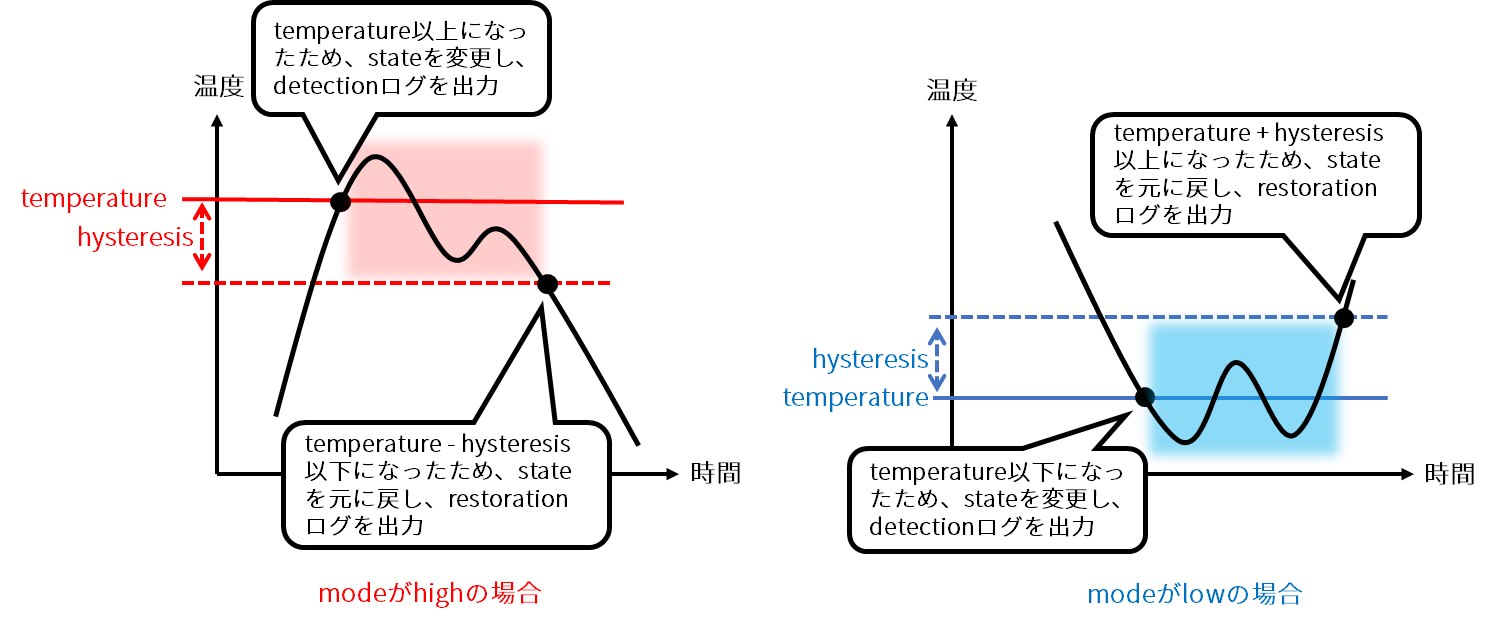
以下の図に、高温時(mode=high)および低温時(mode=low)の動作および設定の概略を示します。
書式
thermal polling POLLING
thermal < cpufreq | mobile | interface > COND-NAME
no thermal < cpufreq | mobile | interface > COND-NAME
enable
no enable
mode MODE
temperature TEMPERATURE
hysteresis HYSTERESIS
log detection LEVEL
no log detection
log restoration LEVEL
no log restoration
show config
state STATE
コマンド
| コマンド | 内容 |
|---|---|
| thermal polling | POLLINGに、温度のポーリング間隔(ミリ秒)を、100~3600000の範囲で指定します。 ここで設定した時間間隔で温度が取得され、制御条件が確認されます。 |
| thermal cpufreq thermal mobile thermal interface | COND-NAMEに条件名を指定します。 ・ 設定モードでコマンドを実行すると、機能ごとの詳細設定モードに移行します。 ・ COND-NAMEには、制御条件を一意に識別できる名称を、32文字以内の英数字およびマイナス文字で指定します。 ・ 「Tab」キーを入力すると、条件名の入力を補完することができます。 |
| enable | 制御条件を有効にします。 |
| no enable | 制御条件を無効にします。 |
| mode | MODEに、制御条件のモードを指定します。 ※4を参照 |
| temperature | TEMPERATUREに、状態を変更する温度(℃)を、-100.0~200.0の範囲で指定します。必須項目です。 ・ temperatureとhysteresisの温度範囲が重複する制御条件を指定することはできません。 ・ modeにlowを指定した場合、highの制御条件よりも高い温度範囲を指定することはできません。 |
| hysteresis | HYSTERESISに、温度ヒステリシス(℃)を、0~100.0の範囲で指定します。 ・ modeにhighを指定した場合、温度が「temperature - hysteresis」以下になったときに、制御条件範囲外になります。 ・ modeにlowを指定した場合、温度が「temperature + hysteresis」以上になったときに、制御条件範囲外になります。 |
| log | 指定したログ出力を有効にします。 ※5を参照 指定できるのは、以下のSyslogです。 ・ emergencies ・ alearts ・ criticals ・ errors ・ warnings ・ notifications ・ informational ・ debugging 制御条件が有効化/無効化されると、以下のログが出力されます。 ・ 制御条件が有効化されたとき: COND-NAME is active ・ 制御条件が無効化されたとき: COND-NAME is inactive |
| no log | 指定したログ出力を無効にします。 ※6を参照 |
| show config | 高低温の保護の設定を表示します。 ➜ 詳しくは、『9.3.1 高低温の保護設定を表示する』を参照してください。 |
| state | ※7を参照 |
| no thermal cpufreq no thermal mobile no thermal interface | COND-NAMEに条件名を指定して、制御条件を削除します。 |
| exit | 詳細設定モードを終了して、設定モードへ移行します。 |
※4
| 設定 | 表示 |
|---|---|
| high | 高温時の制御条件である場合に指定します。 |
| low | 低温時の制御条件である場合に指定します。 |
※5
| 設定 | 表示 |
|---|---|
| destination | LEVELにSyslogレベルを指定して、制御条件の発生時のログ出力を有効にします。 |
| restoration | LEVELにSyslogレベルを指定して、制御条件発生中から復旧したときのログ出力を有効にします。 |
※6
| 設定 | 表示 |
|---|---|
| destination | 制御条件の発生時のログ出力を無効にします。 |
| restoration | 制御条件発生中から復旧したときのログ出力を無効にします。 |
※7
制御条件が範囲内のときの状態を指定します。
どの機能の詳細設定モードなのかによって、設定できる値が異なります。
- CPU動作周波数の場合
| 設定 | 内容 |
|---|---|
| 200MHZ | CPU動作周波を200MHZ固定に設定します。 |
| 250MHZ | CPU動作周波を250MHZ固定に設定します。 |
| 500MHZ | CPU動作周波を500MHZ固定に設定します。 |
| 1000MHZ | CPU動作周波を1000MHZ固定に設定します。 |
| ondemand | CPUの負荷状態に基づいて、CPU動作周波数を動的に変更します。 |
・AIエッジゲートウェイ、センサー接続ゲートウェイはCPU動作周波数の指定に対応していません。
・ファームウェア3.8.0以降のエッジゲートウェイ、IoTルーターでは上記の何れに設定してもCPU動作周波数は1000MHZで固定となり変化しなくなります。
- モバイルモジュールの場合
| 設定 | 内容 |
|---|---|
| enable | モバイルモジュールを有効にします。 |
| disable | モバイルモジュールを無効にします。 |
- インターフェイスの場合
| 設定 | 内容 |
|---|---|
| 10baseT-Half | モードを10baseT-Halfに設定します。 |
| 10baseT-Full | モードを10baseT-Fullに設定します。 |
| 100baseT-Auto | モードを100baseT-Autoに設定します。 |
| 100baseT-Half | モードを100baseT-Halfに設定します。 |
| 100baseT-Full | モードを100baseT-Fullに設定します。 |
| 1000baseT-Auto | モードを1000baseT-Autoに設定します。 |
| 1000baseT-Full | モードを1000baseT-Fullに設定します。 |
| disable | インターフェイスを無効にします。 |
実行例
amnimo(cfg)# thermal polling 1000 ⮠

amnimo(cfg)# thermal cpufreq high ⮠	←CPU動作周波数の詳細設定モードに移行
amnimo(cfg-th-cpu-high)# enable ⮠
amnimo(cfg-th-cpu-high)# mode high ⮠
amnimo(cfg-th-cpu-high)# temperature 100.0 ⮠
amnimo(cfg-th-cpu-high)# hysteresis 10.0 ⮠
amnimo(cfg-th-cpu-high)# log detection warnings ⮠
amnimo(cfg-th-cpu-high)# log restoration notifications ⮠
amnimo(cfg-th-cpu-high)# state ondemand ⮠
amnimo(cfg-th-cpu-high)# exit ⮠

amnimo(cfg)# thermal mobile high ⮠		←モバイルの詳細設定モードに移行
amnimo(cfg-th-mob-high)# enable ⮠
amnimo(cfg-th-mob-high)# mode high ⮠
amnimo(cfg-th-mob-high)# temperature 100.0 ⮠
amnimo(cfg-th-mob-high)# hysteresis 10.0 ⮠
amnimo(cfg-th-mob-high)# log detection warnings ⮠
amnimo(cfg-th-mob-high)# log restoration notifications ⮠
amnimo(cfg-th-mob-high)# state disable ⮠
amnimo(cfg-th-mob-high)# exit ⮠

amnimo(cfg)# thermal interface high ⮠	←インターフェイスの詳細設定モードに移行
amnimo(cfg-th-if-high)# enable ⮠
amnimo(cfg-th-if-high)# mode high ⮠
amnimo(cfg-th-if-high)# temperature 100.0 ⮠
amnimo(cfg-th-if-high)# hysteresis 10.0 ⮠
amnimo(cfg-th-if-high)# log detection warnings ⮠
amnimo(cfg-th-if-high)# log restoration notifications ⮠
amnimo(cfg-th-if-high)# state 100baseT-Auto ⮠
amnimo(cfg-th-if-high)# exit ⮠